Day 16 — Crafting System Foundations
Context
Today marked the beginning of one of the largest and most important systems in Island Crossing: Crafting. This feature ties together nearly every other gameplay loop—gathering, tools, resources, progression—and will become a core part of the long‑term player experience.
Rather than trying to implement everything at once, I split the work between the AI Agent and myself so progress could happen in parallel.
System Architecture & Requirements
I began by outlining the full set of requirements for crafting, including:
- Crafting recipes
- Required ingredients and quantities
- Output items
- Crafting stations
- Crafting UI flow
- Validation logic
- Inventory integration
- Placement and pickup behavior
The list is large, but defining it early will reduce rework later.
Parallel Development Workflow
To keep things moving efficiently:
- The AI Agent began implementing the backend logic and data structures.
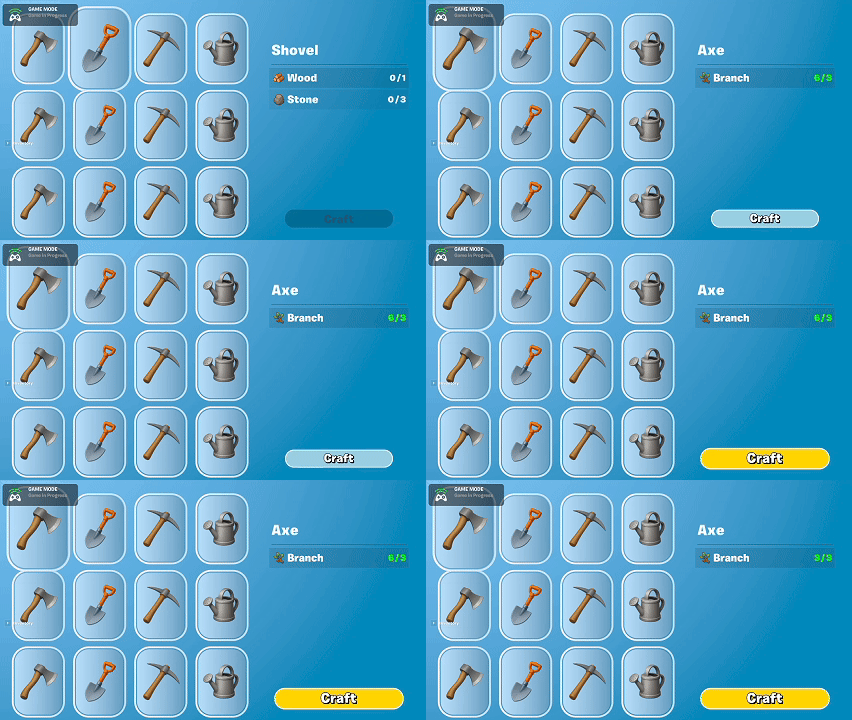
- I focused on building the UWs (User Widgets) that will form the Crafting UI.
This separation made it easier to work iteratively without blocking on UI or logic dependencies.
UI Work
I created the early versions of the UWs that will handle:
- Displaying available recipes
- Highlighting required materials
- Showing the player’s current inventory
- Crafting confirmation flow
Most of these are placeholder visuals, but they establish the overall layout and structure the system will build on.
Summary
What I accomplished:
- Defined the full requirements for the Crafting system.
- Began implementing Crafting backend logic via the AI Agent.
- Created the initial set of Crafting UI widgets.
- Established a parallel workflow to speed up development.
What I learned:
- Large systems benefit from early requirement gathering to avoid rework.
- Parallel work between UI and backend is effective when the system is well‑scoped.
- Crafting will likely be one of the most interconnected systems in the project.