Context
Today I started building out the Response Menu for Home_Edit, which appears when selecting an item that has already been placed. This is an important UX layer that turns placement into a more flexible, editor-like experience.
Response Menu Actions
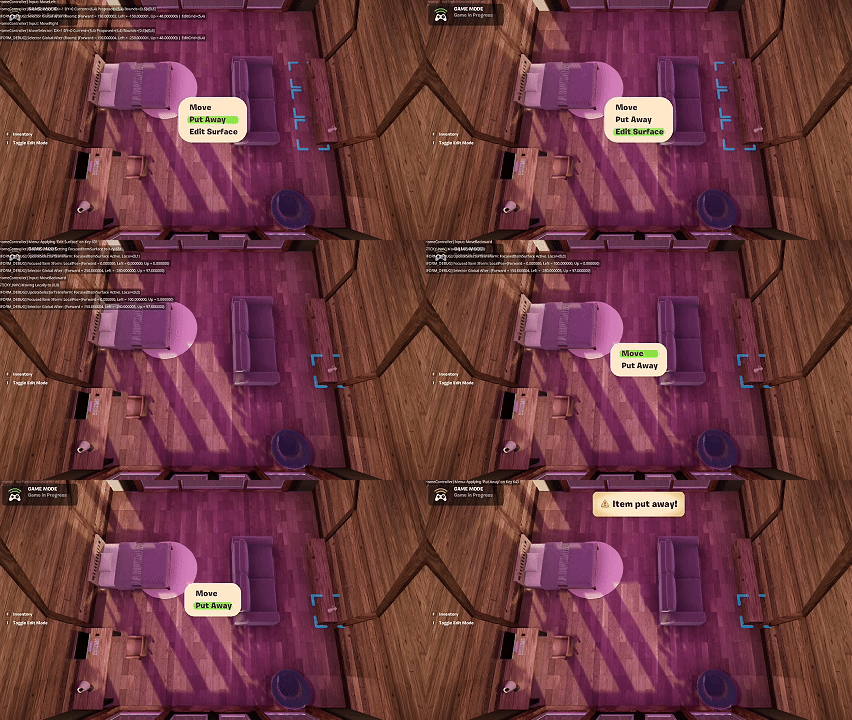
When interacting with a placed home item, players now see contextual options:
- Move — reposition the item
- Put Away — remove the item and return it to inventory
- Edit Surface — modify the surface the item is attached to (when applicable)
This expands Home_Edit beyond simple placement and introduces meaningful post-placement interaction.
Put Away (Working)
The Put Away action is fully implemented and working as expected:
- The item is removed from the scene
- Inventory updates correctly
- Persistence remains intact
This was the cleanest part of today’s work.
Move & Edit Surface (In Progress)
The Move and Edit Surface actions required deeper architectural changes:
- They intersect with placement, hierarchy, and surface ownership
- They rely on the same movement semantics that were already due for refactoring
As a result, a significant amount of refactoring was required, and this work will continue into the next day.
Current State
The Response Menu structure is in place and functional, but some actions are still mid-refactor. This feels like the right time to pause, rather than force incomplete behavior into the system.
Summary
What I accomplished:
- Implemented the Home_Edit Response Menu.
- Added new interaction options: Move, Put Away, Edit Surface.
- Completed the Put Away flow.
- Identified and began refactoring required for Move and Edit Surface.
What I learned:
- Contextual menus quickly expose architectural weaknesses.
- Post-placement interactions are more complex than initial placement.
- It’s better to extend refactors intentionally than patch around them.