Category: Fortnite / UEFN

  • Day 46 — Multiplayer Visual Fixes, Global Action Cursor, and Seed UX Improvements

    Day 46 — Multiplayer Visual Fixes, Global Action Cursor, and Seed UX Improvements

    Context

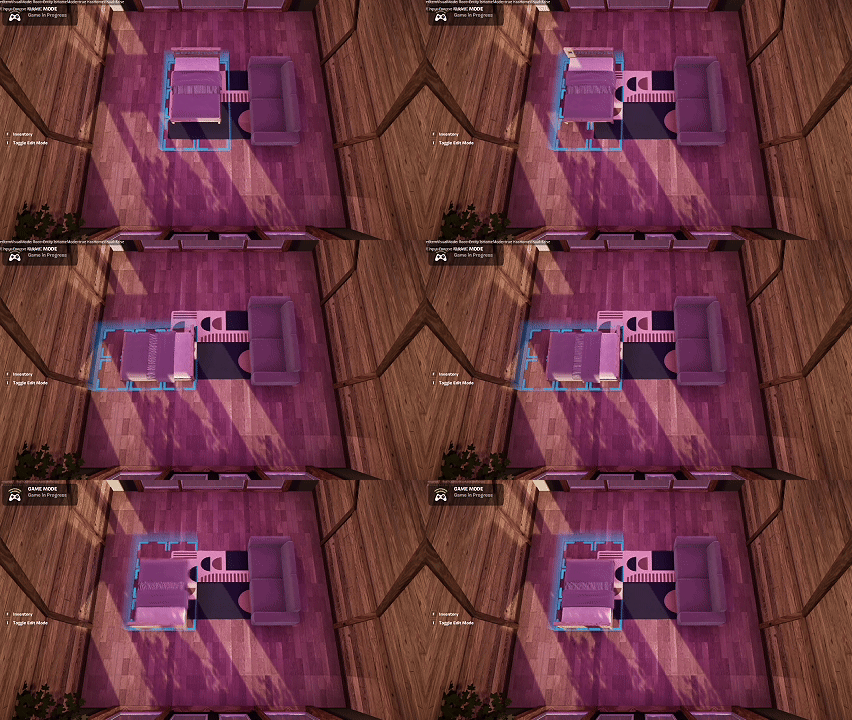
    Today was about closing the loop on multiplayer issues and tightening up some core interaction patterns that had started to sprawl.


    Multiplayer Visual Fixes

    I completed the remaining multiplayer fixes from yesterday. The root cause ended up being fairly simple:

    • The math driving visual placement was incorrect
    • This caused visuals for non-primary players to spawn extremely far away

    Once corrected, visuals now appear correctly for all players in multiplayer sessions.

    Global Action Cursor Refactor

    I also refactored the action preview cursor:

    • Previously, each tool owned its own cursor logic
    • This led to duplication and inconsistent behavior

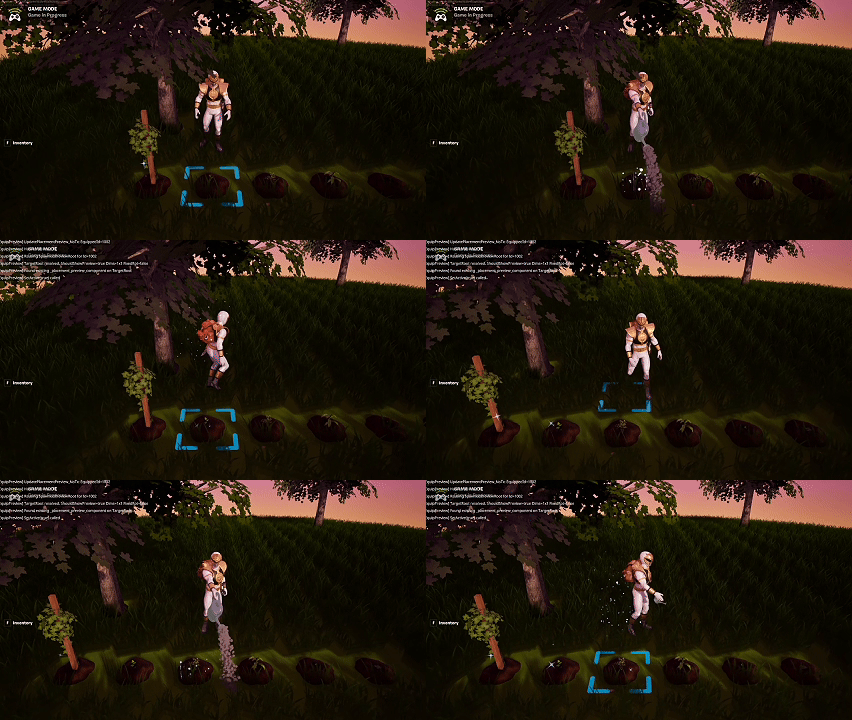
    I pivoted to a single global cursor that:

    • Listens for player state and equipped item
    • Displays the appropriate preview regardless of tool

    This significantly simplifies the system and makes future tools easier to add.

    Seeds as Equipable Tools

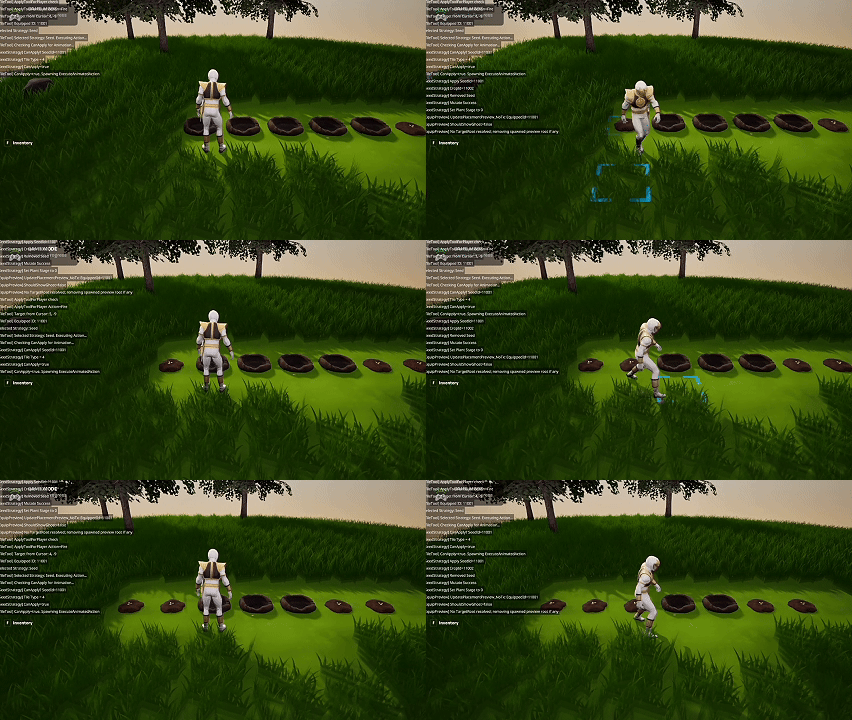
    I changed the behavior of Seeds to function like tools:

    • Seeds can now be equipped
    • Players can walk around with a placement cursor visible
    • Multiple seeds can be planted in succession without reopening the inventory menu

    This makes planting much faster and more fluid.

    Summary

    What I accomplished:

    • Fixed remaining multiplayer visual issues.
    • Corrected placement math for non-primary players.
    • Refactored tool-specific cursors into a global action cursor.
    • Updated Seeds to behave as equipable tools.

    What I learned:

    • Multiplayer bugs often come down to simple math errors.
    • Centralizing shared UX elements reduces complexity.
    • Treating similar interactions consistently improves player flow.
  • Day 45 — Multiplayer Testing, Private Builds, and Visual Sync Issues

    Day 45 — Multiplayer Testing, Private Builds, and Visual Sync Issues

    Context

    Today was focused on validating the game in a true multiplayer environment. After a lot of pre-emptive refactoring, it was time to see how everything actually behaved with more than one player.


    Multiplayer Testing

    I ran several multiplayer tests and had to push a private build multiple times to iterate quickly on fixes. This surfaced a number of bugs that only appear in multiplayer contexts.

    Most systems behaved as expected:

    • Core gameplay loops functioned correctly
    • Persistence held up across sessions
    • Player interactions did not interfere with one another

    Visual Issues for Non-Primary Players

    The main blocker I found was a visual sync issue:

    • Everything looked correct for the first player
    • Any additional players had missing or incorrect visuals

    After digging into it, I was able to track down the root cause. I didn’t apply the fix yet, but at least the problem is now well understood.

    Current State

    While the issue isn’t resolved yet, today was still productive. Identifying multiplayer-only bugs early is exactly why this testing phase exists.


    Summary

    What I accomplished:

    • Tested Island Crossing in multiplayer.
    • Iterated through multiple private builds.
    • Fixed several multiplayer-related bugs.
    • Identified the cause of visual issues affecting non-primary players.

    What I learned:

    • Multiplayer bugs often hide behind single-player assumptions.
    • Visual sync issues are easier to reason about once isolated.
    • Early multiplayer testing prevents much larger problems later.
  • Day 44 — Home Editing Completion, Multiplayer Prep, and Cleanup

    Day 44 — Home Editing Completion, Multiplayer Prep, and Cleanup

    Context

    Today marked the end of the Home Editing chapter. The focus was on finishing the remaining work, stabilizing the system, and making sure it wouldn’t block future multiplayer support.


    Home Editing Completion

    I fixed the remaining bugs across the Home_Edit system and brought all related features to a complete, usable state. At this point:

    • Placement, movement, surface editing, and removal all behave as intended
    • Persistence is reliable
    • The Response Menu flows cleanly across all supported actions

    This feels like a natural stopping point for Home Editing before shifting focus elsewhere.

    Pre-Emptive Multiplayer Refactoring

    With Home Editing complete, I moved on to pre-emptive refactoring for multiplayer. The main addition here was a system for managing login grants:

    • Initial loadouts can now be changed centrally
    • Makes testing significantly easier
    • Will be useful for structured playtests and beta testers

    This also sets the groundwork for handling different player states in multiplayer scenarios.

    Bug Cleanup Across Systems

    I also took time to fix bugs that had surfaced in other systems as a side effect of the Home work:

    • Farming
    • Tools
    • Crafting

    These were mostly regressions caused by shared components being extended during Home development.


    Summary

    What I accomplished:

    • Completed the Home Editing feature set.
    • Fixed remaining Home_Edit bugs.
    • Implemented a login grants system for testing and multiplayer prep.
    • Cleaned up regressions across farming, tools, and crafting.

    What I learned:

    • Large feature chapters benefit from a clear end point.
    • Multiplayer concerns should be addressed early, even if multiplayer comes later.
    • Feature work almost always creates downstream bugs that need intentional cleanup.
  • Day 43 — Home_Edit Response Menu & New Interaction Paths

    Day 43 — Home_Edit Response Menu & New Interaction Paths

    Context

    Today I started building out the Response Menu for Home_Edit, which appears when selecting an item that has already been placed. This is an important UX layer that turns placement into a more flexible, editor-like experience.


    Response Menu Actions

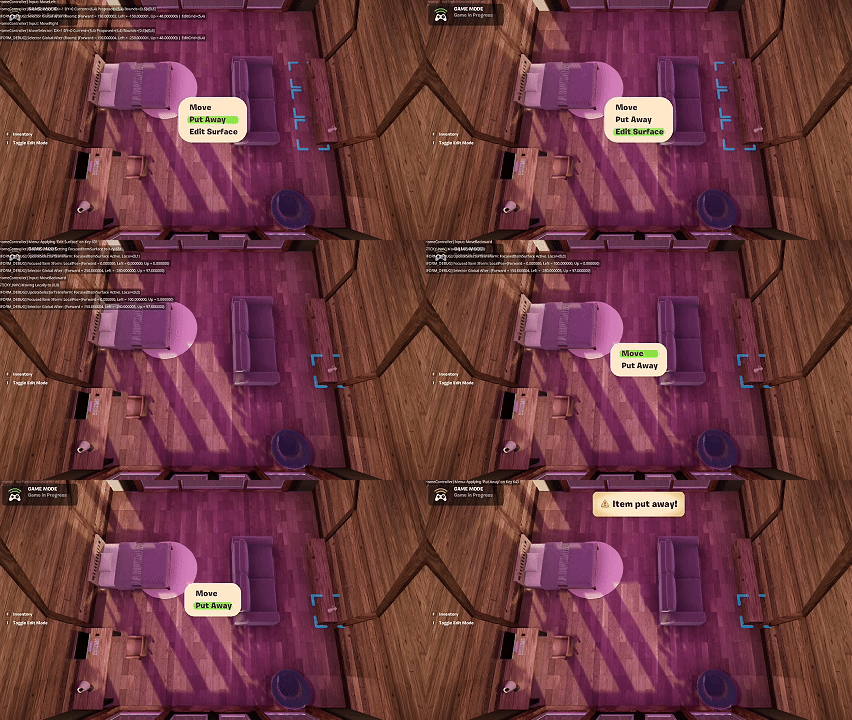
    When interacting with a placed home item, players now see contextual options:

    • Move — reposition the item
    • Put Away — remove the item and return it to inventory
    • Edit Surface — modify the surface the item is attached to (when applicable)

    This expands Home_Edit beyond simple placement and introduces meaningful post-placement interaction.

    Put Away (Working)

    The Put Away action is fully implemented and working as expected:

    • The item is removed from the scene
    • Inventory updates correctly
    • Persistence remains intact

    This was the cleanest part of today’s work.

    Move & Edit Surface (In Progress)

    The Move and Edit Surface actions required deeper architectural changes:

    • They intersect with placement, hierarchy, and surface ownership
    • They rely on the same movement semantics that were already due for refactoring

    As a result, a significant amount of refactoring was required, and this work will continue into the next day.

    Current State

    The Response Menu structure is in place and functional, but some actions are still mid-refactor. This feels like the right time to pause, rather than force incomplete behavior into the system.


    Summary

    What I accomplished:

    • Implemented the Home_Edit Response Menu.
    • Added new interaction options: Move, Put Away, Edit Surface.
    • Completed the Put Away flow.
    • Identified and began refactoring required for Move and Edit Surface.

    What I learned:

    • Contextual menus quickly expose architectural weaknesses.
    • Post-placement interactions are more complex than initial placement.
    • It’s better to extend refactors intentionally than patch around them.
  • Day 42 — Home Items on Surfaces & Rethinking Move Semantics

    Day 42 — Home Items on Surfaces & Rethinking Move Semantics

    Context

    Today I focused on enabling home items to be placed on top of other home items, such as vases on tables. This is a key step toward making interiors feel layered, expressive, and closer to expectations set by cozy life-sim games.


    Items on Surfaces (Now Working)

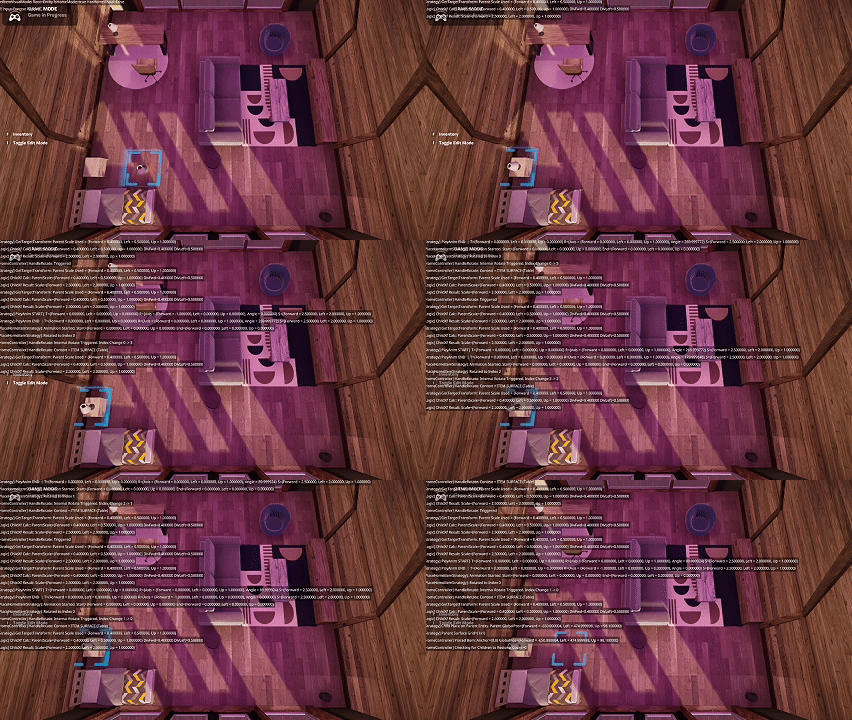
    I successfully enabled placement of certain items on other items:

    • Decorative items (like vases) can be placed on furniture (like tables)
    • Surface-based placement works reliably in normal use

    At this point, home items on surfaces are functionally working and usable. There are still a few minor edge cases—such as rugs interacting oddly with ground placement—but overall the feature is in a good state and ready to build on.

    The Problem: Moving Parent Items

    The main remaining issue appears when interacting with the parent item:

    • Selecting and moving the table does not always correctly handle attached child items
    • This exposed flaws in how placement and movement were previously implemented

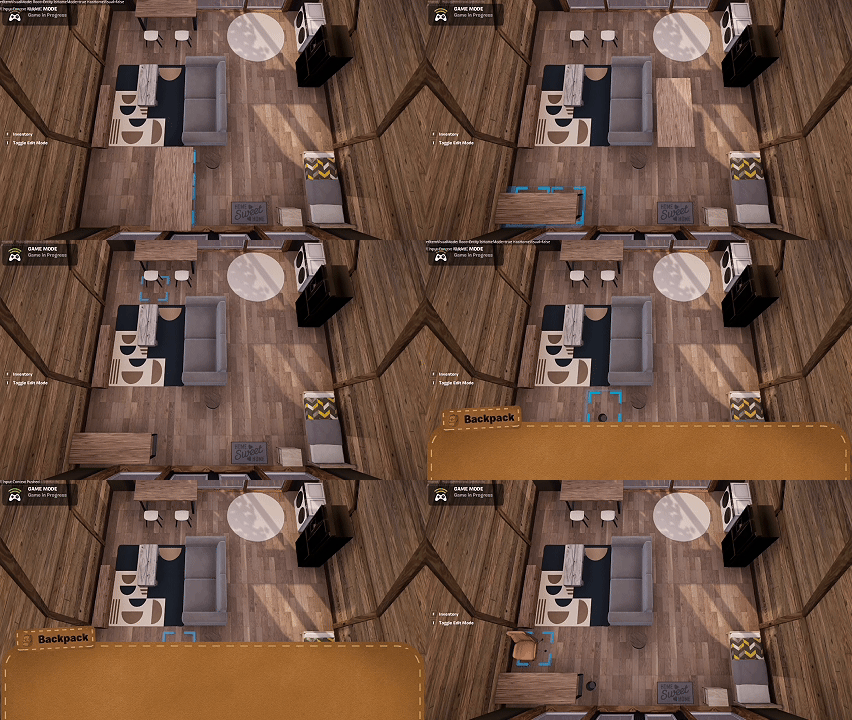
    Historically, moving an item worked by:

    • Destroying the entity
    • Re-adding it while moving
    • Destroying it again
    • Re-adding it permanently

    This approach was sufficient for simple placement but breaks down once items can have children.

    Planned Refactor

    The path forward is clear: placement and movement need to stop relying on destroying entities.

    Instead:

    • Items should persist while being repositioned
    • Child items should remain attached and move with their parent

    This will require a larger refactor, but it’s the correct foundation for layered interiors.


    Summary

    What I accomplished:

    • Enabled home items to be placed on top of other home items.
    • Shipped surface placement in a usable state.
    • Identified and isolated remaining issues with parent–child movement.

    What I learned:

    • Layered placement introduces true hierarchy concerns.
    • Destroy-and-recreate movement does not scale.
    • Minor visual bugs are acceptable once core interaction works.
  • Day 41 — Persistence Cleanup, Home Item Scale‑Up, and Hitting System Limits

    Day 41 — Persistence Cleanup, Home Item Scale‑Up, and Hitting System Limits

    Context

    Today was another extended stay in bug jail, but a productive one. The focus was persistence—specifically chasing down a chain of issues where fixing one problem would expose the next.


    Persistence Fixes

    I worked through a series of persistence bugs:

    • Fixing one save/load issue would reveal another
    • Edge cases appeared when combining placement, re‑selection, and interior transitions

    After working through them systematically, everything is now saving and loading reliably, and the Home system feels solid again.

    Scaling Up Home Items

    With persistence stable, I finished setting up all of the home items I had prepared. The game now supports ~50 home items that can be placed inside homes.

    This immediately exposed a practical limitation: I hit constraints around how many items can be handled cleanly inside a single function.

    Pragmatic Refactor

    To move forward, I refactored the item setup logic to work around these limits. It’s not the most elegant implementation, but:

    • It’s significantly easier for me to manage
    • It scales to hundreds of items, which is the real requirement

    This felt like a reasonable trade‑off between ideal architecture and long‑term maintainability.


    Summary

    What I accomplished:

    • Fixed a cascade of persistence issues.
    • Stabilized save/load behavior for home items.
    • Added ~50 home items to the system.
    • Refactored item setup logic to support large catalogs.

    What I learned:

    • Persistence bugs often hide in layers.
    • Fixing the last bug is usually harder than the first.
    • Practical scalability sometimes matters more than elegance.
  • Day 40 — Bug Jail, Placement Preview Regression, and Constraint Polish

    Day 40 — Bug Jail, Placement Preview Regression, and Constraint Polish

    Context

    Today was largely about polish and stability. As the Home and Home_Edit systems grow, I’m starting to feel the weight of regressions where small changes can cause outsized breakage. Today’s main issue was one of those moments.

    Placement Preview Regression

    I spent most of the day chasing down a regression where the placement preview was no longer displaying correctly.

    This involved:

    • Arguing with AI agents over incorrect assumptions
    • Restoring older snapshots to isolate the issue
    • Carefully diffing recent changes

    Eventually, I found the root cause and got it fixed. It appears that a recent refactor unintentionally broke the preview logic. This was frustrating, but also a reminder that even well‑structured systems can become fragile as they scale.

    Small but Important Fixes

    In addition to the regression fix, I completed several smaller tasks that improve overall stability and UX:

    • Set up dozens of home items as prefab entities
    • Added support for certain home items to not be rotatable (e.g., wall‑mounted TVs, ceiling items)
    • Prevented players from equipping tools while in Home or Home_Edit mode
    • Fixed issues where tools were still visually displayed despite being unequipped
    • Added a placement constraint when building a home: it must be at least two tiles away from a tree to prevent branches clipping through interiors

    Current Concerns

    Despite frequent refactoring and attempts to keep the codebase scalable, today reinforced a concern: as the project grows, the surface area for subtle regressions grows with it. Catching these issues early requires discipline, tooling, and patience.


    Summary

    What I accomplished:

    • Fixed a major placement preview regression.
    • Added rotation constraints for wall and ceiling items.
    • Improved Home/Home_Edit input and equip restrictions.
    • Expanded home item prefabs.
    • Added placement rules to prevent environmental clipping.

    What I learned:

    • Regressions are inevitable as systems scale.
    • Snapshotting and diffing are essential debugging tools.
    • Architectural discipline reduces—but does not eliminate—fragility.
    • “Bug jail” days are part of building complex systems.
  • Day 39 — Default Home Items, Interior Spawn Refactor, and Agent Workflow Friction

    Day 39 — Default Home Items, Interior Spawn Refactor, and Agent Workflow Friction

    Context

    With the Home_Edit placement system complete, today was about making homes feel lived in by default and improving the overall spatial consistency of interiors.

    Default Home Items

    I added support for default items that spawn inside homes. For the starter setup, I included four ceiling downlights. These behave exactly like other home items:

    • They can be moved
    • Removed
    • Repositioned using Home_Edit

    This helps interiors feel intentional from the moment a player enters, rather than empty or purely functional.

    Interior Spawn Refactor

    I made a significant change to how homes are spawned and entered.

    Previously:

    • The exterior home mesh was essentially a dummy
    • Entering the home teleported the player to a distant interior location
    • This was done in anticipation of streaming and performance constraints

    After revisiting this, I decided it was overly cautious and introduced several UX and consistency issues.

    Now:

    • The Home Interior entity spawns directly on the island
    • Entering the home keeps the player in the same world space
    • You can see surrounding objects while inside

    This feels much more grounded and cohesive, and I strongly prefer this approach.

    Refactoring & Agent Workflow Challenges

    This change required another round of refactoring, especially around placement, transitions, and interior state handling.

    I also ran into workflow friction with AI agents:

    • Gemini 3 Pro would not function reliably in Agent mode
    • I ended up using Gemini in Ask mode for analysis and task breakdowns
    • ChatGPT 5.2 handled the actual Agent‑based code execution

    While this worked, it added extra overhead and context switching. I still strongly prefer Gemini 3 Pro for reasoning, but it requires more manual orchestration.


    Summary

    What I accomplished:

    • Added default home items (ceiling downlights).
    • Enabled full editing support for default items.
    • Refactored home interior spawning to remain on the island.
    • Improved spatial consistency and interior UX.
    • Navigated a multi‑model AI workflow to complete the changes.

    What I learned:

    • Default content dramatically improves perceived quality.
    • Over‑optimizing for performance too early can hurt UX.
    • Clear architectural decisions reduce long‑term complexity.
    • AI tools are powerful, but orchestration still matters.
  • Day 38 — Home Item Placement Completion & Persistence

    Day 38 — Home Item Placement Completion & Persistence

    Context

    Today marked the completion of the Home_Edit item placement system. After several days of iteration, refactoring, and bug fixing, the goal was to fully stabilize placement across all interior surfaces and ensure everything persisted correctly between sessions.


    Final Placement Fixes

    Most of today’s work focused on resolving remaining issues with wall and ceiling placement. These were the most error‑prone cases due to camera orientation, coordinate transforms, and surface targeting.

    With these fixes in place:

    • Placement logic behaves consistently across all surfaces
    • Visual indicators correctly reflect placement state
    • Edge cases during re‑selection and movement are resolved

    Persistence Pass

    I completed a full persistence pass for home items:

    • Items placed on the floor, walls, and ceiling now save correctly
    • All items load back into the correct position and orientation
    • Re‑selecting items after re‑entering the home works as expected

    This was a critical milestone, since Home_Edit would not be viable without reliable save/load behavior.

    Re‑Selection & Editing

    Placed items are now fully editable:

    • You can re‑select any placed object
    • Move it to a new location
    • Rotate it again

    This applies uniformly across floor‑, wall‑, and ceiling‑mounted items.

    Documentation & Agent Updates

    To prevent future regressions, I:

    • Updated internal documentation
    • Revised instructions and context for the coding agents
    • Clarified ownership boundaries and expected behaviors

    This should reduce friction as more features are layered on top of Home_Edit.


    Summary

    What I accomplished:

    • Completed home item placement for floor, wall, and ceiling surfaces.
    • Fixed remaining bugs related to wall and ceiling placement.
    • Finalized persistence for all placed home items.
    • Enabled full re‑selection, movement, and rotation after placement.
    • Updated documentation and agent guidance.

    What I learned:

    • Persistence is the true test of system completeness.
    • Wall and ceiling interactions require extra architectural care.
    • Clear documentation is essential once systems reach this level of complexity.
  • Day 37 — Placement Corrections, Wall Editing, and Refactoring for Stability

    Day 37 — Placement Corrections, Wall Editing, and Refactoring for Stability

    Context

    Today was about stabilizing the Home_Edit system as it grows in complexity. As more features stack on top of placement and editing, small architectural ambiguities start to surface quickly.


    Placement & Re‑Placement Fixes

    I corrected several issues related to placing and re‑placing interior items. These bugs mostly showed up when:

    • Moving an item after it had already been placed
    • Switching surfaces or cameras mid‑edit
    • Re‑selecting objects across different edit states

    Fixing these helped reduce a number of frustrating edge cases.

    Overlap Rules & Layering

    I also added explicit support for controlled overlap between item types:

    • Rugs can overlap with furniture
    • Furniture cannot overlap with other furniture

    This introduces a simple but important layering system that mirrors expectations from cozy life‑sim games and makes interiors feel more flexible without becoming chaotic.

    Wall Placement Progress

    I made meaningful progress on wall placement:

    • Wall‑mounted items are now supported
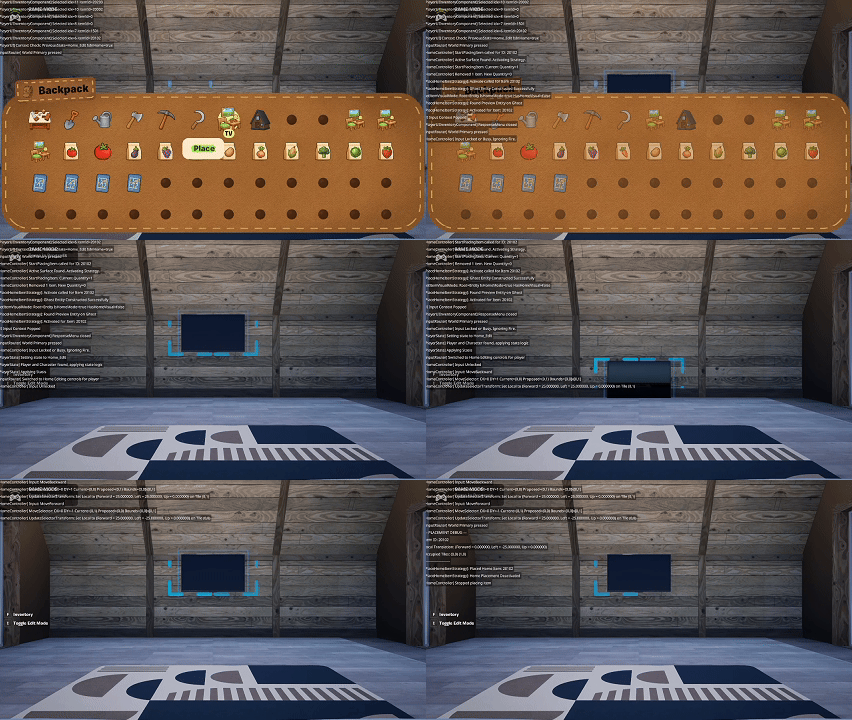
    • I successfully placed a TV on the wall

    This validated the wall coordinate system and camera alignment approach, even though more refinement is still needed.

    Refactoring for Clear Ownership

    A large portion of the day went into refactoring. I found:

    • Duplicate logic spread across multiple components
    • Unclear ownership of placement state and validation
    • Implicit assumptions that were no longer true as the system expanded

    These were strong signals that more components were needed to centralize responsibilities and reduce coupling.

    Current State

    Before refactoring, the system felt extremely fragile—small changes could cause cascading regressions. While this refactor required a lot of back‑and‑forth with coding agents and frequent testing, the system is already feeling more resilient.


    Summary

    What I accomplished:

    • Fixed several placement and re‑placement bugs.
    • Added controlled overlap rules for interior items.
    • Enabled wall‑mounted item placement (TV).
    • Began implementing wall editing support.
    • Refactored components to reduce duplication and clarify ownership.

    What I learned:

    • Layering rules are essential for intuitive interior customization.
    • Wall placement introduces a new level of spatial complexity.
    • Fragility is often a symptom of unclear responsibility boundaries.
    • Refactoring early prevents exponential pain later, even if it slows progress short‑term.